What is TypeScript?

TypeScript is a language on top of JavaScript. Everything possible in JavaScript is available in TypeScript – it is a superset of JavaScript. It provides two strong advantages. The first one is that it transpiles TypeScript into JavaScript so the advanced ECMAScript features not available to all web browsers can be used by providing a polyfill. It acts as a combination of other static checkers combined with Babel. The second advantage of TypeScipt is that it can enforce static typing to catch potential issues earlier in the lifecycle of development. It reduces the need for some unit tests and can analyze the code to find runtime errors at design time.


TypeScript was made public since 1 October 2012, but its inception started at Redmond two years prior as an internal product (2010) at Microsoft. The project is open-source, hosted on Github.com under an Apache2 license.

TypeScript’s popularity increases year after year. It has 317 branches, 228 contributors, 48 releases, 188 pull requests monthly created with over 3 600 forks and 25 000 stars. The consistent cadence of a new version releases every two months and the great ecosystem of people contributing make it a stellar open source project. It evolves rapidly to sustain developers’ needs, and it follows the rapid pace of web technologies.

TypeScript is far from being used only by its creator, Microsoft. While it’s true that many Microsoft products use TypeScript, such as Microsoft Teams, Visual Studio Team Services (VSTS), the online version of Office, and Visual Studio Code (VSCode), to say the least, other technology giants have been borrowing the advantages of static typing. Google has been using TypeScript since Angular 2, Slack has migrated their JavasScript code base to TypeScript as well, and other companies like Ubisoft, Asana, Ericsson, Upwork, Bloomberg, and Lyft are following suit. The reason I mention these systems that use TypeScript is to highlight the investment of thousands of developers and the millions of lines in these technologies. Most of them come from different backgrounds. Aside from the tremendous amount of work and knowledge poured across the industry, it illustrates that many people before you had to decide whether to go with TypeScript or not—and chose to do so. While most of the examples provided are big projects, they all do have one thing in common, i.e. some people must write and maintain the code. Static typing shines in these areas, from small to big projects.

Here is a quick note about who is leading TypeScript. Anders Hejlsberg manages TypeScript. He is the creator of Turbo Pascal, Delphi, C# and now TypeScript. Hejlsberg graduated in the ‘80s, has received many awards in his career, and is the person who made the most commits on GitHub on that project. Having such a prolific engineer at the head of TypeScript boosts the maturity of the language.

The TypeScript community is beyond the repository where it resides. StackOverflow’s members are strong, with more than 35 000 questions. There are plenty of examples with TypeScript code with many different frameworks. It’s not difficult to find Angular or React examples written in TypeScript or popular projects like the famous TodoMVC.

TypeScript is all about having a strongly typed language at design time, but the code produced doesn’t contain any type. The type gets erased because Typescript removes types, interfaces, aliases at transpilation and ends up with a common JavaScript file. The removal may sound logical but the lack of type at runtime results in a design that must not rely on the type dynamically at runtime. We will see examples of this when working on type comparisons to figure out the interface used. Keep in mind that interface and type are not available at runtime, hence how can this check be performed when the code executed is a challenge?

Mutable and Immutable Arrays

In this lesson you will learn about two different syntaxes to define an array.

Arrays in TypeScript are exactly like in JavaScript in terms of features. The difference is that TypeScript assigns a type to the list.

The syntax, as shown below, utilizes square brackets [] with the actual type before the brackets and after the colon.

It is also possible to initialize values during the declaration. In the following example, the two arrays are typed. TypeScript infers that the first one is number and the second is a string. You can move your cursor over the two variables to see the type.

Using multiple types will require you to evaluate what the type of each value is before using an individual item of the array. This is because the variable’s operations are type-dependent. There is an equivalent syntax that uses the generic Array<T>. Both are the same.

You can initialize an empty list by setting the variable equal to empty square brackets. An array can use one or many unions to allow multiple types. Union will be discussed later. At that stage, remember that with multiple types, you must to wrap the union with parentheses.

The preference to explicitly declare type or not depends on your style of coding. For maintainability, it is good practice to be explicit. With a peek at the code above may notice, you know that the array takes 2 types without having to read further. It also forces future additions to be constrained by the expected type. Without explicitly typing the variable, someone could add a string and suddenly the variable allows a number, boolean, and string.

Before moving on, it is important to note that you can also instantiate a strongly typed object array. This is equivalent to creating a new array without assigning any values.

Immutable arrays

While the two syntaxes presented above refer to mutable collections, there is also the possibility to desire a list that is immutable. The ReadonlyArray is a generic array that allows only to read from the array once it’s constructed. As with the mutable array, there are two ways to write a read-only collection.

The first approach is to use ReadonlyArray<T> instead of Array<T>.

Control flow analysis for array construction

Control Flow Analysis is how TypeScript figure out dynamically what type it should infer. Arrays can be tricky since they accept many values which can be of many types. For example, the following code accepts a list of numbers or strings.

The last question may surprise you. The empty array is an evolving type that will be analysed during the “flow” of the code, meaning depending of what happen with the following operations. Functions like pushshiftunshift or setting directly to an index a value myArray[index] = value will transform the type. The type is finally attributed once it stops changing, hence the question #4 gets to its real type at the end of the code, not before which could be anything.

In this lesson, we saw two different syntaxes to write an array in TypeScript. We also illustrated that it is possible to have the content of an array to be immutable with readonly. We also described the difference between a constant and a read-only list.

Read more:

Top 5 Websites to Learn Coding (Python,Ruby,Java) for Beginners in 2020

Learn Code

So one of the greatest things about programming is that you can create so many things that solves so many issues in your life and others. But the worst thing about programming is the learning curve and the tedious hours you have to go through to learn the programming language that makes you hate yourself for even thinking about putting yourself in this ridiculous situation in the first place. But you love the end result, hence like the common masochist you continue even when it hurts.

So you want to be a programmer, but you don’t know how to start and since your a millennial or gen x’er in the existing in the 20’s of the 21 century, you know YouTube and Google are your best-friends, but you also realize that just sitting down watching a video for 4 hours would really suck. Luckily there are other options on the internet that helps curb this absurdly boring method.

before you do anything though, the best way to start is to get a grasp on symbolic logic. Understanding symbolic logic and it’s subsets, propositional logic. this is mostly the process of turning arguments into symbols and analyzing the truth value and false value of them by doing proofs and using valid argument forms. This isn’t a mandatory need, but this will help you understand logic statements and get your mind rolling down the path of understanding logic in computer science, which programming is based on. You can likely find this around google somewhere or you can go here (http://intrologic.stanford.edu/public/index.php) and (http://www.philosophy-index.com/logic/forms/). Now here are the top 5 places you can go to that will help you learn different types of programming languages.

Codecademy

Price: 19.99/month

Description: Codecademy is free if you want to learn just the basics of the top languages of this age. They have courses for C++, R, Ruby, Java, Javascript, Python, Swift, and more. They claim that they are committed to building the best learning experience inside and out, making Codecademy the best place for our team to learn, teach, and create the online learning experience of the future.

My opinion: I think that Codecademy is worth the money. But if you are like me and like things that are free, then you probably don’t want to spend 20 dollars a month on something you can watch on YouTube and download a text editor so you can do same exercises yourself. I don’t like paying for anything because I’m cheap.


Udemy

Price: depends on the course you buy and language

Description: So Udemy is a website that has a myriad of different courses that provide in depth information for anything specific. They have drawing courses, marketing courses, data science, anything you can think of. So we know that they have courses for programming too like Python and Java as well as teaching concepts like Object Oriented Programming, Functional programming, building GUI’s and more.

My opinion: I think this is better than Codecademy because you can find courses for free or cheaper than 20 dollars. They also always have sales that you can take advantage of. The only drawback with this option is that you have to really apply yourself in order to make sure you get through all the lessons because they are really boring depending on what you buy and there’s no real flexibility in terms of what is being given to you as a lesson. The lessons can make a lot of assumptions about what their viewers already know and what they do not. And that is pretty ridiculous, but it’s the beast you have to tangle with.

W3schools.com

Price: Free

Description: This is a website that concentrates mostly on web development and gives users access to the knowledge of languages that are associated with web development. They teach you the basics when it comes to markup languages like HTML then move on to bigger and more popular languages like Java, Python, C++, C# and more in relation to web development. he site derives its name from the World Wide Web (W3), but is not affiliated with the W3C. W3Schools was originally created in 1998 by Refsnes Data, a Norwegian software development and consulting company.

My Opinion: Definitely better then the ones previously mention mainly because of the aspect that it’s FREE. That word is so sacred when your a broke millennial so always seek it out and make sure it becomes your idol, your God, your lover, your…well…you get the point. The only drawback is that it is heavily focused on only web development so you might learn the language, but will be limited to only knowing how to create web apps and not more things outside of the internet. This will force you to seek out other options. Bummer


Sololearn

Price: Free

Description: This organization created a platform that puts learning and social networking in the same space. They claim “Learning has never been this social and accessible for so many! Bit-sized lessons and fun practice sessions grab your attention and keep you focused, for guaranteed best results!” They have an app that can be used on both your android and Apple phone as well as the opportunity to learn on the browser as well. They also make the lessons game like so that the user feels like they are achieving something each time they go through the lessons. They would receives badges, points, and achievements that does the job of showing the user their own progress.

My Opinion: Sololearn is something I personally use to get ahead on material and learn the basics of what I need to know. It’s useful when you are trying to kill time on the train, which helps you ignore the strange smells that always linger in the train station. Each language has at least more than 50 lessons on it.

FreeCodeCamp

Price: Free

Description: Best APP OUT THERE!!whoops, this is supposed to be the objective section, sorry. This Website is a One-stop shop for all your Software development needs. It provides the user with understanding Javascript through and through and does this one thing very well. Now it doesn’t have tutorials for other languages out right, but through their forums and articles they link to good free resources and videos that can help you learn these things.

My Opinion: I believe that if you want to learn the basic and intermediate level information for data structures and algorithms in JavaScript, this is the best place to start. Learning data structures and algorithms in one language doesn’t limit you either because it helps you apply the concepts of these things to other language that you will later learn. They have thousands of hours of lessons for JavaScript and links to learn other languages through their search bar. Some might say the other options are better than this one because the lessons are right there for you on the platform, but in my opinion I feel like a lot of the other ones only have their users dip their toes in each of the languages and don’t do enough to apply the language to solving common computer science problems. This is different with free code camp; it gives you the instruction learning the coding language and applies the language to learning data structures, algorithms and more which helps the user understand the science of programming rather than just being able to build cool stuff.

Well that my “informed” opinions in a nutshell. I hope you found this hopeful. This blog is guaranteed to change your life for the better or worse (the worse I’m sure 😈). Have a wonderful day!

Serverless Web Application with Lerna and Webpack

In this Guide we will learn how to write Serverless services in Monorepo style.

When I tried to write a solutions combine Serverless, Webpack and Lerna together, I can’t find any good guide how to do this, then, after implementing it I feel like I want to share my finding with the community,

What is Lerna?

Lerna,a tool for managing JavaScript projects with multiple packages, mostly used for Monorepo, Monorepo is beneficial strategy to keep all your repositories in a one global repository, contains all the common infrastructure and build tools, while each sub ‘package’ contains a different business project.

So if I have different services, I’ll keep all of them in one repository, each one in a different package.

You have a file structure that looks like this:

package.json
packages/
package-1/
package.json
package-2/
package.json

My root package.json contains some common dependencies like aws-sdk and some dev-dependencies like webpack

{
  "name": "root",
  "private": true,
  "dependencies": {
    "aws-sdk": "^2.531.0",
    "request-promise": "^4.2.5",
    "request": "^2.88.0"
  },
  "devDependencies": {
    "express": "4.17.1",
    "lerna": "^3.19.0",
    "serverless-webpack": "^5.3.1",
    "webpack": "^4.40.2",
    "webpack-cli": "^3.3.9"
  }
}

Read more about Lerna and it’s feature in Lerna github.

Let’s serverless it:

Serverless framework gives us the ability to deploy a serverless application (GCP,AWS,AZURE)

A basic example of yml file defining a Lambda:

service: MyService

provider:
  name: aws
  runtime: nodejs12.x

package:
  exclude:
    - node_modules/**

functions:
  myFunction:
    handler: index.myFunction

Let’s bundle it, Adding webpack to the party:

We obviously won’t want to deploy the full code to AWS, and we may want to use webpack to bundle it into one huge index file.

In order to do that I use serverless-webpack plugin

All the work needed, is just adding it to the serverless file:

service: MyService

provider:
  name: aws
  runtime: nodejs12.x

package:
  exclude:
    - node_modules/**

plugins:
  - serverless-webpack
functions:
  myFunction:
    handler: index.myFunction

And the index file wii look like this:

module.exports.myFunction = async (event, context) => {

    //doing all stuff needed :)
};

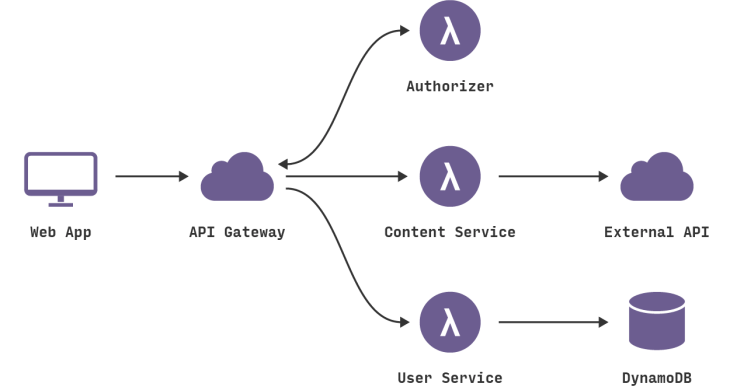
We mention that package is a business service unit, and it can be split to multiple Lambdas, for example UserService, can be split to 3 Lambdas for create, delete and update.

index.js will be like:

module.exports.createUser = async (event, context) => {

    //doing all stuff needed :)
};


module.exports.updateUser = async (event, context) => {

    //doing all stuff needed :)
};

module.exports.deleteUser = async (event, context) => {

    //doing all stuff needed :)
};

With its equivalent serverless.yml

service: UserService

provider:
  name: aws
  runtime: nodejs12.x

package:
  exclude:
    - node_modules/**

plugins:
  - serverless-webpack
functions:
  createUser:
    handler: index.createUser
  updateUser:
    handler: index.updateUser
  deleteUser:
    handler: index.deleteUser
What can I achieve from managing all my packages in the same repo?

Sure, I can have one yml file contains my VPC configuration, security groups, subnet ids, common environment variables and more, and all of them in a one root yml file. this can be referred from any serverless.yml:

provider:
  name: aws
  stage: prod
  runtime: nodejs12.x
  vpc:
    securityGroupIds: ${file(../../.root.yml):securityGroupIds}
    subnetIds: ${file(../../.root.yml):subnetIds}

  environment:
    ${file(../../.root.yml):environment}

And the root.yml:

securityGroupIds:
  - "sg-xxxxx"
subnetIds:
  - "subnet-xxxxx1"
  - "subnet-xxxxx2"
  - "subnet-xxxxx3"
environment:
  KEY1: value1
  KEY2: value2

Conclusion

In this Guide we implement monorepo contains some services, each service can contains multiple lambdas, and each lambda is deployed using serverless framework, and we set some common configuration in the root folder to affect all sub packages.