I’ve been writing web applications for more than a decade. From classic ASP to PHP, ASP.Net web forms and the list goes on and on. However, something that’s been common between all those years for me has been to care about how performing the site is. One important part of that has been to look out for memory leaks, because they can cause the page to go super slow or even crashing in more serious scenarios.
Intro
Memory leaks are a common problem in software development, regardless of whether the language you’re using is memory managed or not. By that I mean languages which come with a garbage collector. Memory leaks happen when a piece of memory is allocated, but never freed by the application, and is not returned to the container app or the operating system.
I remember going through the concept in uni, but I can’t remember anything apart from the fact that usually there is a tree made up of all the occupied memory locations. Every time the garbage collector is looking into the memory parses that tree, and if a node is not connected to any branch, it gets recollected and returned to the main program.
Most of us web developers are likely to use one of the major frameworks or libraries to write our applications. Some maybe using a bit older languages like PHP or Ruby, but no matter what we use, there will be a high chance that we come face to face with this problem one way or another.
Consequences
So what happens when there is a memory leak in our applications 🤔?
In some cases the memory consumption just keeps going up. If the user is using a decent spec machine, they might not even realise it. Not everyone is obsessed like us developers checking their task manager often to see how much memory is consumed.
Regardless, it slows down the page, makes interactions not responsive, and might even cause the tab or the whole window to crash.
Memory leak in JavaScript
It’s way easy in JavaScript to allocate some memory and forget about it. Even if you’re not writing plain JavaScript, it’s still possible that a memory leak happen, without you noticing it.
But how does it happen?
In JavaScript there are a few possible ways a memory leak can happen.
- Unintentionally creating global variables
- Timers and callbacks
- Out of DOM references
- Closures
- Event listeners
Out of DOM references (detached DOM)
When some nodes are removed from the DOM but still exists in memory through JavaScript, we have out of DOM references or detached DOM. Usually it means there is a reference to a variable which was referencing that node.
DOM is a doubly linked tree, meaning any reference to any node would mean the entire tree would not be garbage collected.

Let’s go through an example to make this a bit more clear:
function create() {
  let ul = document.createElement('ul');
  ul.id = 'list';
  for (var i = 0; i < 10; i++) {
    var li = document.createElement('li');
    li.textContent = `Item # ${i}`;
    ul.appendChild(li);
  }
  return ul;
}

const list = create();

document.body.appendChild(list);

function deleteList() {
  document.body.removeChild(document.getElementById('list'));
}

document.getElementById('delete').addEventListener('click', deleteList);
Clicking the delete button, will remove the list from the DOM, but there is a reference in JavaScript, so the list never gets garbage collected. We could identify detached node using heap snapshots in your browser DevTools. I am using Chrome here, but you can use Edge (similar to Chrome), and Firefox too.
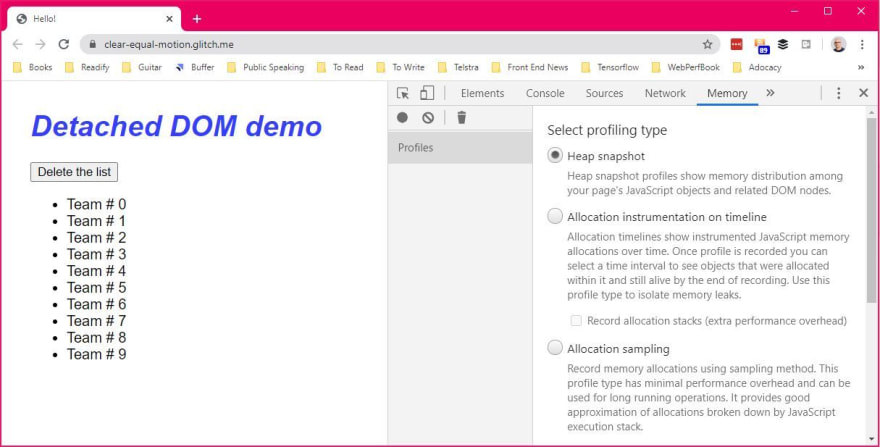
And once the snapshot is taken, type detached in the filter text box and you’ll see the detached DOM nodes.

The way to fix these kind of issues is to always use local variables so that the reference is destroyed once the function execution is done.
Summary
We saw what will cause a potential memory leak in JavaScript and how to fix those issues, however, keep in mind that in most cases if you’re using a framework or library, these things are handled for you. If you’re using a library which you might suspect is causing memory leaks, you could easily find out using your browser DevTools memory profiler.
Hope this article has raised some awareness so that you can write more performing code and make user experience much better. No one wants to have their browser chew up memory like cheesecake right 😁?