Modern Cloud Security Layer [Explain]

Healthcare organizations store personal and potentially sensitive customer data. Financial institutions store account numbers, balances, and transaction history. Retailers store purchase history, account information, and demographic details of customers. A security incident might expose this sensitive data, which might cause personal embarrassment or financial harm. How do you ensure the integrity of their data and ensure that your systems are secure?

In this article, you’ll learn about the important elements of the security pillar.

What is security?

Security is ultimately about protecting the data that your organization uses, stores, and transmits. The data that your organization stores or handles is at the heart of your securable assets. This data might be sensitive data about customers, financial information about your organization, or critical line-of-business data that supports your organization. Securing the infrastructure on which the data exists, along with the identities used to access it, is also critically important.

Your data might be subject to additional legal and regulatory requirements, depending on where you’re located, the type of data you’re storing, or the industry in which your application operates.

For instance, in the healthcare industry in the United States, there’s a law called the Health Insurance Portability and Accountability Act (HIPAA). In the financial industry, the Payment Card Industry Data Security Standard is concerned with the handling of credit card data. Organizations that store data that’s in scope for these laws and standards are required to ensure that certain safeguards are in place for the protection of that data. In Europe, the General Data Protection Regulation (GDPR) lays out the rules of how personal data is protected, and defines individuals’ rights related to stored data. Some countries require that certain types of data do not leave their borders.

When a security breach occurs, there can be substantial impacts to the finances and reputation of both organizations and customers. This breaks down the trust that customers are willing to instill in your organization, and can affect the organization’s long-term health.

Defense in depth

A multilayered approach to securing your environment will increase the security posture of your environment. Commonly known as defense in depth, we can break down the layers as follows:

  • Data
  • Applications
  • VM/compute
  • Networking
  • Perimeter
  • Policies and access
  • Physical security

Each layer focuses on a different area where attacks can happen, and creates a depth of protection if one layer fails or is bypassed by an attacker. If you were to focus on just one layer, an attacker would have unfettered access to your environment if they got through this layer.

Addressing security in layers increases the work an attacker must do to gain access to your systems and data. Each layer will have different security controls, technologies, and capabilities that will apply. When you’re identifying the protections to put in place, cost is often of concern. You’ll need to balance cost with business requirements and overall risk to the business.
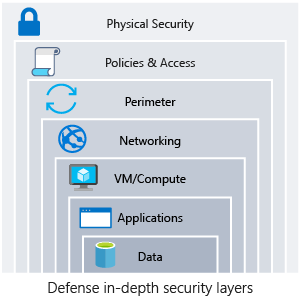
cloud-security-layers

No single security system, control, or technology will fully protect your architecture. Security is more than just technology; it’s also about people and processes. Creating an environment that looks holistically at security and makes it a requirement by default will help ensure that your organization is as secure as possible.

Protect from common attacks

At each layer, there are some common attacks that you’ll want to protect against. The following list isn’t all-inclusive, but it can give you an idea of how each layer can be attacked and what types of protections you might need.

  • Data layer: Exposing an encryption key or using weak encryption can leave your data vulnerable if unauthorized access occurs.
  • Application layer: Malicious code injection and execution are the hallmarks of application-layer attacks. Common attacks include SQL injection and cross-site scripting (XSS).
  • VM/compute layer: Malware is a common method of attacking an app hosting environment, which involves executing malicious code to compromise a system. After malware is present on a system, further attacks that lead to credential exposure and lateral movement throughout the environment can occur.
  • Networking layer: Unnecessary open ports to the internet are a common method of attack. These might include leaving SSH or RDP open to virtual machines. When these protocols are open, they can allow brute-force attacks against your systems as attackers attempt to gain access.
  • Perimeter layer: Denial-of-service (DoS) attacks often happen at this layer. These attacks try to overwhelm network resources, forcing them to go offline or making them incapable of responding to legitimate requests.
  • Policies and access layer: This layer is where authentication occurs for your application. This layer might include modern authentication protocols such as OpenID Connect, OAuth, or Kerberos-based authentication such as Active Directory. The exposure of credentials is a risk at this layer, and it’s important to limit the permissions of identities. You also want to have monitoring in place to look for possible compromised accounts, such as logins coming from unusual places.
  • Physical layer: Unauthorized access to facilities through methods, such as door drafting and theft of security badges, can happen at this layer.

Shared security responsibility

Revisiting the model of shared responsibility, we can reframe this in the context of security. Depending on the type of service you select, some security protections will be built in to the service, while others will remain your responsibility. Careful evaluation of the services and technologies that you select will be necessary, to ensure that you’re providing the proper security controls for your architecture.
What is Cloud DevOps?

Cloud DevOps is a Software as a service (SaaS) platform from AWS/GCP/Microsoft that provides an end-to-end DevOps toolchain for developing and deploying software.

It also integrates with the most-leading tools on the market and is an excellent option for orchestrating a DevOps toolchain.

What does Cloud DevOps provide?

Cloud DevOps includes a range of services covering the complete development life cycle.

  • Cloud Boards: agile planning, work item tracking, visualization, and reporting tool.
  • Pipelines: a language, platform, and cloud-agnostic CI/CD platform-supporting containers or Kubernetes.
  • Repos: provides cloud-hosted private git repos.
  • Artifacts: provides integrated package management with support for Maven, npm, Python, and NuGet package feeds from public or private sources.
  • Test Plans: provides an integrated planned and exploratory testing solution.

Also, you can use Cloud DevOps to orchestrate third-party tools.

What if we are not a Microsoft / Microsoft .NET organization?

Azure DevOps is not focused on organizations that are end-to-end Microsoft or Windows.

Azure DevOps provides a platform that is:

  • Flexible: you do not have to go ‘all in’ on Azure DevOps. It is possible to adopt each of the services independently and integrate them with your existing toolchain; most popular tools are supported.
  • Cross-Platform: designed to work with any platform (Linux, macOS, and Windows). Or language (including Node.js, Python, Java, PHP, Ruby, C/C++, .NET, Android, and iOS apps). Azure DevOps is not aimed at organizations building and shipping on the Microsoft technology stack.
  • Cloud Agnostic: continuous delivery is supported to AWS, GCP, and Azure.

How to Create an Azure Cloud CDN

Content Delivery Networks (CDNs) can significantly speed up the delivery of assets on a web site. However, as not all websites are the same, it’s important to determine whether your own deployments will benefit.

For a global training business that publishes significant numbers of videos, Azure blob storage is a good match to your business model. Azure Blob storage also enables simple web publishing. However, your company’s plans to expand could overload a single point of distribution.

In this unit, you’ll learn about how Azure CDN works, and how to create one to improve the performance of a static website.

What is a CDN?

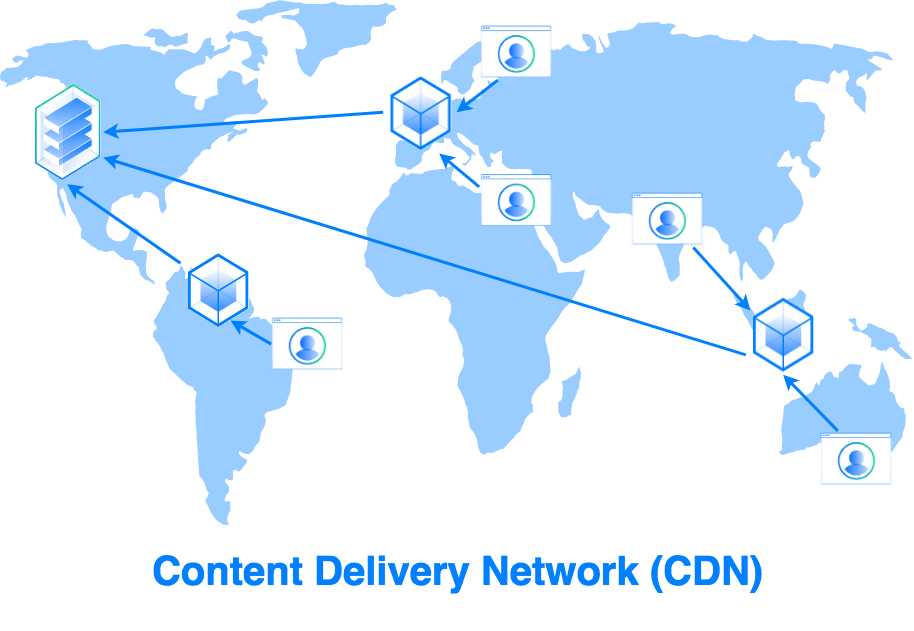
A CDN is a network of web servers that cache website content in different geographical locations. CDNs help to minimize latency by caching website content at point-of-presence (POP) locations that are close to large clusters of users. The use of a CDN is transparent to users of your site.

Geographic distance between a website user and the server hosting the site can be a major contributor to latency. Distance creates latency because of two main factors:

  • First, the transmission speed of electrical signals is finite. The longer the distance is the longer it takes for a sent message to reach the other side.
  • Second, long-distance connections between two computers tend to pass through a relatively large number of internet routers, and each “hop” adds latency.

Using a CDN to cache content closer to users reduces both the transmission delay and the number of router hops.

Enabling a CDN

The process of enabling a CDN for a site depends on the CDN provider you use, but typically requires three steps:

  1. Enter a service agreement with the CDN provider. The service agreement is completed through a web portal.
  2. Configure the CDN.
  3. Modify your site implementation to use the CDN URL for assets that you want cached on the CDN. The changes you’ll need to make will vary significantly depending on the implementation of your site.

How a CDN works

When a user requests a file or asset, the request is routed to the closest POP.

If the data is present on the POP, the data is retrieved.

If the data isn’t present, the POP will request it from the origin server, return the data to the user and store local copy. Follow-on requests for the data will then be local to the POP.

There are four types of CDN available in Azure:

  • Standard Microsoft
  • Standard Akamai
  • Standard Verizon
  • Premium Verizon

The types vary by features and caching options.

This module focuses on the Standard Microsoft CDN. For more information on each type, see the Further Reading section of the Summary unit.

What is an Azure CDN?

Azure Content Delivery Network (CDN) is Azure’s content delivery network. It’s a distributed network of servers that is used to cache and store content. These servers are in locations that are close to end users to minimize latency.

The server locations are referred to as Point-of-presence (POP) locations. CDNs store cached data on edge servers, or servers close to your users, in these POP locations.

Features and Benefits of Microsoft Azure CDNs

Features that Microsoft Azure CDNs offer are:

  • Dynamic site acceleration – speed up the delivery of static files
  • HTTPS custom domain support – enable encrypted connections to custom domains, such as https://www.contoso.com
  • Azure diagnostics logs – view core analytic information and send the data to an Azure Storage Account, Azure Event Hubs, or Log Analytics Workspace
  • File compression – increase performance by reducing the number of bytes in transit
  • Geo-filtering – create rules on your CDN endpoint that uses specific paths to allow or block content in selected countries

For more information on these features, see the Further Reading section of the Summary unit.

The benefits from using Microsoft Azure CDNs include:

  • Better performance and a smoother user experience with large or streamed files.
  • Improved results with applications that require multiple round trips to display content.
  • Greater scaling, especially with rapidly spiking loads, such as global launch events.
  • Reduced traffic to the origin server.

Assessing the Suitability of CDNs

CDNs are typically best suited to technologies that employ many large static files. They can also be useful where you need the ability to serve files to a large number of simultaneous users worldwide, for example at a product launch. However, the standard Microsoft CDN in Azure doesn’t provide significant advantage with dynamic sites.

CDNs and Web Servers

Azure CDN supports Web servers running on virtual machines in Azure as origin servers. You can also connect Azure CDN to Azure Websites. By doing that, your site is distributed globally to reduce latency and increase user satisfaction. When you connect your Web site into CDN and propagate the files, you end up with an identical file structure in CDN.

Creating a CDN requires specifying a new CDN in Azure. Then you configure an endpoint that points to the origin server or blob storage account. Azure requires unique names for the CDN path and the origin server URL. The exercise in the next unit covers this procedure.

CDNs with Serverless apps and Web apps

A serverless web app in Azure requires no deployment, configuration, or management of servers. This model contains the following components:

  • Blob storage – static web files (HTML, CSS, and JavaScript) are stored in Azure Blob storage, which implements static website hosting. Any dynamic interaction is through JavaScript calls to backend APIs. In consequence, there’s no server-side code to render the web page.
  • Function apps – uses an event-driven model to invoke functions (pieces of code) by using triggers (events). With a serverless app, the trigger might be an HTTP get request.
  • API Management – provides an API gateway that publishes and manages the APIs that client functions use. The gateway also helps to decouple the front-end applications from the APIs. API management can translate URLs, apply transforms to data requests between front and back ends, and configure response headers.

Azure CDN caches the serverless web app content, providing lower latency and faster content delivery to users. CDN can also provide an endpoint for encrypted HTTPS connections. Azure CDN provides similar interaction with Azure Web apps.

CDN Components

Now let’s look in more detail of how CDNs work. There are two concepts here: The CDN profile and CDN endpoints. This section also covers POP propagation times.

CDN Profiles

A CDN profile is a container for one or more CDN endpoints. Each CDN endpoint specifies a pricing tier and provides a link to the cached content on the POP.

When you create a profile, you can specify to create a CDN endpoint or you can create endpoints later. Note how you specify a pricing tier when you create the profile.

CDN Endpoints

When you create an endpoint, you must ensure that the endpoint type matches the origin source correctly. For example, static websites in Azure require an endpoint set to “custom origin”. With storage accounts, where you can create a CDN matched to that account.

For more information on integrating a storage account into an Azure CDN, see the Further Reading section of the Summary unit.

POP Propagation Times

Propagation times between POPs vary, according to which CDN profile and pricing tier you’re using.

  • Azure CDN Microsoft Standard profile typically propagates in 10 minutes
  • Azure CDN Verizon Standard and Azure CDN Verizon Premium profile typically complete in 10 minutes
  • Azure CDN Akamai Standard profile usually propagates in 1 minute