What is Software Development Models | Software development life cycle (SDLC)

When developing software you need to focus on various things. Writing code is not your only task though it is still vital. Basically, you should answer the following questions: what you’re going to do, how, using which methods, and why. To take it all into account and effectively organize the workflow, you need to choose a suitable software development model.

Software development models

To navigate through this complicated process you will require a more complex thing than a simple to-do list. Thus, you will definitely be in need of a development model, which describes in detail not only your steps in the right order but also the methods you use and the whole structure of a future product. There exist a lot of such models. In general, they are called SDLC, i.e. Software development life cycle. Below, we will discuss the most popular models, look into their essence, and compare their core features.

All SDLC models can be divided into several groups depending on the workflow organization, type of relationships within the teammates, and their communication with the customers.

The workflow may be linear or iterative, i.e. you either work on your product step by step or you can get back to the previous stages and change them. In terms of relationships and communication, you can either take the task from the customer and then simply show what you’ve got or you can consult with the customer at every stage.

Now let’s observe the specific models and consider their pros, cons, and application.

Waterfall

The process in this model moves in a linear cascade mode through all the development stages: analysis, design, coding, testing, deployment. The waterfall model means there’s no way back, so you cannot make any changes. Moreover, you cannot start the next step till the previous one is completed.


The final result will be seen and checked only at the very end of the development. It means that testing is often rushed, and errors may be costly to fix.

However, this model has some advantages. The waterfall allows to predict project costs and to introduce precise deadlines. This model suits for small projects with short deadlines and specific tasks and for those in which the tasks are to be completed no matter how much money it will take.

The waterfall model assumes that the client receives the finished product as soon as all functionality is ready, and not when all the individual features are done. This can be a problem if the client doesn’t like something and wants to make some changes. This problem is solved by the iterative model, where each feature can be demonstrated right after it is finished.

Iterative model

In reality, errors always arise during development and it’s better to solve them as soon as possible before everything crushes. Iterating model allows to check problems and thus fix the mistakes in time. Besides, you may need to make some changes if your customer decides to amend the task. Also, the external environment and market conditions may change, and the original version of the product might be no longer relevant and useful.

Among the advantages here we can single out a higher probability of getting what the customer wants. And in general, such a development is very flexible, since changes can be made at any stage. However, it is unknown how long the editing will take and how much money will have to be allocated for it. These can be considered the disadvantages of this model.

This SDLC model typically entails some customer involvement because it’s possible that small changes will be required during the development process. But human interaction is also a complex process. This means that it must be described in detail, the rules for this communication must be established in order to increase the productivity. For this, agile group models were invented.

Agile group

So far, we have noted that it is important to take errors into account, consider the costs, and act according to an algorithm. But we forgot the most important thing: the people who do all this. Agile was invented to fix this. Agile is a set of principles and rules that facilitate the development process and take into account the human factor. All principles are written in the Agile manifesto. We will analyze them in more detail in a separate topic. For now, it is important to know that the developers are more important than the development, and if they cannot agree on what they do and how they do it, there will be no good result. It is also important to follow the wishes and mood of the customer. After all, if he does not like it, then again, the result won’t be satisfactory.

So, Agile means working in close collaboration both within the team and with clients. At the end of each iteration, stakeholders review development progress and re-prioritize tasks for future iteration to improve return on investment and align with user needs and business goals.

Conclusion

So, we’ve briefly discussed why we need development models, what they are, their advantages and disadvantages. Now we also understand which models are useful in which specific cases. Further on we will deepen this knowledge with specific examples.

How to create a pull request on GitHub

You’ve learned how to create a pull request when there’s guidance – either in a pull request template, or in a CONTRIBUTING file. But what if a project doesn’t (yet) offer that guidance and documentation on conventions?

Describe your changes

A best practice writing a commit message, and subsequently your pull request, is the following:

Your Git commit message subject line should complete the following sentence: If applied, this commit <will your subject line here>. It contains a succinct description of the change using the imperative, present tense: “add” not “added” nor “adds”. Limit your subject line to 50 characters, start with a capital letter, and don’t end with a period (.). You can use emoji in your subject line, and @-mention other GitHub users, although not everyone is a fan of such frivolity.

For the body of your message and pull request, continue to use present tense, and make sure to include the motivation for the change. Contrast this with the previous behavior. Use the real estate at your disposal to explain the what and why vs. the how.

Your commit message is only as to the point as the content that you’re about to submit. Commit / submit for review small, isolated sets of changes. This also increases the likelihood of your changes getting merged into the project.


Adding granularity

Before you submit your pull request, check the sidebar for ways to complete your PR. Select Reviewers and/or Assignees if you’re familiar with the project’s team structure. Add Labels when there’s guidance on using those in for instance the CONTRIBUTING.md file. You can use labels as a visual clue as to what you’re trying to accomplish. A maintainer may also add a label (or: multiple labels). Some of the labels we use in the repository for this Learn module for instance are:

  • (red colored label) bug: something isn’t working
  • (blue) documentation: improvements or additions to documentation
  • (grey) duplicate: this issue or pull request already exists
  • (teal) enhancement: new feature or request

Optionally you can link issues in the sidebar as well, where successfully merging a pull request may close the corresponding issue. And you can customize your subscription to notifications on the thread – some PRs receive a lot of comments, reviews, and CI/CD related notifications. You can choose between:

  • Not subscribed, and only receive notifications when you have participated or have been @mentioned.
  • Subscribed, and receive all notifications for this pull request.
  • Custom, and only be notified for the events you select

Exercise

Using the First Contributions  project practice forking, cloning, and ultimately submitting a pull request. The First Contributions project aims to “guide the way beginners make their first contribution”, and has guides for both using the command line, as well as several GUIs (Graphical User Interfaces). The project also has support for several languages, make sure to check their Translations folder.

With the lessons from the previous module and the above in mind, now go back to a pull request you opened recently (or: navigate to the pull requests tab of a project you’re watching), and find out how a good subject line can make all the difference. Consider updating a pull request accordingly. Put roughly as much time in writing your PR as you did making the change to the project, so to help the maintainer(s) to triage (categorize and prioritize) community contributions.

Bonus: check Microsoft’s Accessibility Guidelines and Requirements, and in particular the bit about “describing interactions with UI”, to avoid ableist language in your Docs contributions. Customers interact with products using different input methods: keyboard, mouse, touch, voice, and more. You will want to use generic verbs that work with any input method, for instance “select” instead of the input-specific “click” or “swipe”.

What is Markdown?

Markdown exists to shield content creators from the overhead of HTML. While HTML is great for rendering content exactly how it was intended, it takes up a lot of space and can be unwieldy to work with, even in small doses. The invention of Markdown offered a great compromise between the power of HTML for content description and the ease of plain text for editing.

Emphasizing text

The most important part of any communication on GitHub is usually the text itself. But what do you do when some parts of the text are more important than others?

Using italics in text is as easy as surrounding the target text with an asterisk (*) or underscore (_). Just be sure to close an emphasis with the same character it opened with (do not mix asterisks and underscores).

markdown
This is *italic* text.

This is italic text.

Bold text uses two asterisks (**) or underscores (__).

markdown
This is **bold** text.

This is bold text.

You can also mix different emphases.

markdown
_This is **bold and italic** text_.

This is bold and italic text.

To use a literal asterisk, escape it with a backslash (\).

markdown
\_This is all \*\*plain\*\* text\_.

_This is all **plain** text_.

Declaring headings

HTML provides content headings, such as the <h1> tag. In Markdown, this is supported via the # symbol. Just use one # for each heading level from 1-6.

markdown
###### This is H6 text
This is H6 text

Linking to images and sites

Image and site links use a very similar syntax.

markdown
![Link an image](https://cloudspoint.xyz/media/mara.png)

marad

markdown
[Link to Microsoft Learn](https://docs.microsoft.com/learn)

Link to Microsoft Learn

Making lists

You can define ordered or unordered lists. Ordered lists start with numbers and unordered lists can use asterisks or dashes (-).

markdown
1. First
1. Second
1. Third
  1. First
  2. Second
  3. Third

You can also define nested items through indentation.

markdown
- First
  - Nested
- Second
- Third
  • First
  • Nested
  • Second
  • Third

Building tables

Tables can be constructed using a combination of pipes (|) and dashes (-).

First|Second
-|-
1|2
3|4
TABLE 1
First Second
1 2
3 4

Quoting text

Blockquotes can be created using the greater than (>) character.

> This is quoted text.

This is quoted text.

Filling the gaps with inline HTML

If you come across an HTML scenario not supported by Markdown, you can simply use that HTML inline.

markdown
Here is a<br />line break

Here is a
line break

Working with code

Markdown provides default behavior for working with inline code blocks delimited by the backtick (`) character. When decorating text with this character, it is rendered as code.

This is `code`.

This is code.

If you have a code segment spanning multiple lines, you can use three backticks (“`) before and after to create a fenced code block.

```
var first = 1;
var second = 2;
var sum = first + second;
```
var first = 1;
var second = 2;
var sum = first + second;

GFM extends this support with syntax highlighting for popular languages. Just specify the language as part of the first tick sequence.

```javascript
var first = 1;
var second = 2;
var sum = first + second;
```
JavaScript
var first = 1;
var second = 2;
var sum = first + second;

Cross-linking issues and pull requests

GFM supports a variety of shortcode formats to make it easy to link to issues and pull requests. The easiest way to do this is to use the format #ID, such as #3602. GitHub will automatically adjust longer links to this format if you paste them in. There are also additional conventions you can follow, such as if you are working with other tools or want to specify other projects/branches.

CROSS-LINKING ISSUES AND PULL REQUESTS
Reference type Raw reference Short link
Issue or pull request URL https://github.com/desktop/desktop/pull/3602 #3602
# and issue or pull request number #3602 #3602
GH- and issue or pull request number GH-3602 GH-3602
Username/Repository# and issue or pull request number desktop/desktop#3602 desktop/desktop#3602

For more information, see Autolinked references and URLs.

Linking specific commits

You can link to a commit by pasting in its ID.

LINKING SPECIFIC COMMITS
Reference type Raw reference Short link
Commit URL https://github.com/desktop/desktop/commit/8304e9c271a5e5ab4fda797304cd7bcca7158c87 8304e9c
SHA 8304e9c271a5e5ab4fda797304cd7bcca7158c87 8304e9c
User@SHA desktop@8304e9c271a5e5ab4fda797304cd7bcca7158c87 desktop@8304e9c
Username/Repository@SHA desktop/desktop@8304e9c271a5e5ab4fda797304cd7bcca7158c87 desktop/desktop@8304e9c

Mentioning users and teams

Typing an @ symbol, followed by a GitHub username, will send a notification to that person about the comment. This is called an “@mention”, because you’re mentioning the individual. You can also @mention teams within an organization.

@githubteacher

@githubteacher

For more information, see Receiving notifications about activity on GitHub.

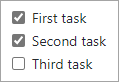
Tracking task lists

You can create task lists within issues or pull requests using the syntax illustrated below. These can be helpful to track progress when used in the body of an issue or pull request.

trak list

- [x] First task
- [x] Second task
- [ ] Third task