What is HTTP/3?

HTTP/3 is the successor to HTTP/2. Given that it took 16 years to move from HTTP/1.1 to HTTP/2, should you tackle the theme of HTTP/3?

You probably guess so. I wouldn’t be writing about it if I didn’t think otherwise. It is worth keeping up to date on this thread. Just as HTTP/2 has made significant changes over HTTP/1.1 by switching from ASCII to the binary way of transferring data, HTTP/3 again makes significant changes, this time switching the underlying transport from TCP to UDP. This change is a key change that occurs in this iteration of changes.

Although HTTP/3 is still under development. The official specification is a sketch. It is slowly being implemented. Unfortunately, until then, you have to take into account the unstable operation of this version of HTTP/3.

However, there are many unknowns and questions about how HTTP/3 works. What are the Benefits? What should network engineers, system administrators, and programmers know?

Comparison between HTTP/2 and HTTP/3

HTTP/2 provides a big performance boost as it solves the HTTP row header blocking (HOL) problem. It implements request/response multiplexing, binary framing, header compression, stream prioritization, and server push.
The HTTP/3 protocol is even faster as it includes all of the HTTP/2 protocol and solves the TCP HOL blocking problem. HTTP/3 is still only a draft. It is more efficient, uses fewer resources (system and network), requires encryption (SSL certificates are mandatory) and uses UDP.
Web browsers will likely continue to support older versions of HTTP for a while. The performance benefits and search engine ranking of sites that support HTTP/3 will speed up large-scale implementation.
In the near future, website owners will likely want to support HTTP/3 as well. However, it is more controversial than HTTP/2, and may have natural opponents in the form of large networks.

Performance

A 100-millisecond delay in loading a web page can cut your conversion rate by 7%!

Source: Akamai Online Retail Performance Report: Milliseconds Are Critical

Read more: Best Web Hosting 2022 Reddit Recommendations

Is HTTP / 3 protocol already available?

While the standard is still in development, website owners and visitors can start getting HTTP/3 support through browsers, operating systems, and other client applications. Of course, there will probably be more changes to the standard, which has already undergone several implementations.

After the release of HTTP/3, the whole network won’t switch over right away. Many sites don’t use HTTP/2 yet.

One potential obstacle to the new protocol is that it requires increased CPU utilization by both the server and client. This impact is likely to decrease over time as technology develop.

TCP HOL blocking problem

TCP congestion control is supported by implemented mechanisms of packet rollback and retransmission. This is done by being used when data integrity loss is detected. Retransmission ensures that the data is ultimately delivered in a consistent and complete form.

Solving the TCP HOL problem

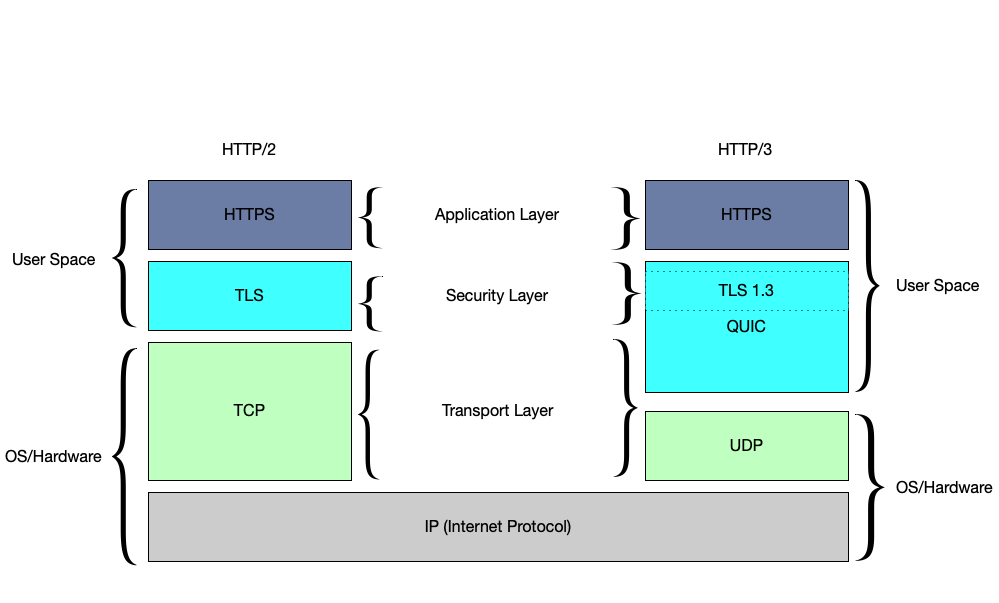
Solving the TCP HOL blocking problem required more than just switching to UDP, as it is still necessary to guarantee correct and complete data transfer while guaranteeing low server loads. The QUIC protocol was designed to improve the performance of this area, Provides optimized HTTP over UDP communication.

Since QUIC takes control of the management of streams, binary frames, etc., little remains to be done for HTTP/2. Defacto QUIC + HTTP is now HTTP/3.

The QUIC OSI model is based on the fact that the IP address is the base connecting the two stacks. The left HTTP protocol stack adds TCP, TLS, and HTTP / 2 to the IP address. The HTTP protocol stack on the right adds UDP, a special block, and “HTTP over QUIC”. The special block includes QUIC congestion control and similar to TCP and the ability to recover lost data and additionally a block of QUIC encoding / cryptography.

There are many versions of QUIC as the protocol has been developed and implemented in production environments for years. There is even a Google-specific version called GQUIC. Therefore, it is important to distinguish the old QUIC protocols from the new HTTP/3 standard.

What is UDP?

The User Datagram Protocol (UDP) is an alternative to TCP. It does not provide stream virtualization or the same guarantees that TCP offers. Instead, it provides an easy way to pack data into a packet, address it to another computer, and send it. It is unreliable, disordered, and has no form of congestion and loss control.

Its aim is to operate lightly and to provide the minimum operating functions necessary to enable communication. In this way, the application can exercise its own guarantees. This is often very useful in real-time applications. For example, in telephone calls, users typically prefer to receive 90% of the data immediately rather than 100% of the data ultimately.

Is HTTP/3 always encrypted?

HTTP/3 Includes Encryption One of the main implementation challenges for HTTP/3 is the need to modify the TLS / SSL libraries to add the required new functionality.

This change is due to the fact that HTTP/3 differs from HTTPS in terms of the encryption method. With the older HTTPS protocol, only the data itself is TLS protected, leaving the rest of the data decoded. In HTTP/3, both data and the transport protocol are protected. The protocol optimizes the redundant activities present in HTTP/2. Therefore, encrypting the transport protocol as well as the data actually increases the protocol performance.

Summary

The new protocol is faster and extends the currently used one. Nevertheless, I do not think it is quickly spread and available as the main one. I’m curious when WordPress hosting plans come with HTTP/3 as standard.

Cloud Hosting growth 18%

Cloud computing is expected to grow 18% this year, resulting in a market size of around $300 billion.

The Infrastructure as a Service segment of cloud computing, (such as that provided by AWS) is expected to grow by a whopping 27%! WordPress powers 39.6% of the websites in 2021, so wordpress hosting will boom!

What does that mean for you?

It means there are significant investments in infrastructure – and a massive opportunity for developers.

If you haven’t delved into the world of cloud computing, or want to add some new skills, it’s a great time. Companies are already scrambling to find talent with the skills to migrate or build new projects – and that means higher salaries.

To get you started, we’ve put together our top cloud skills:

1. Amazon Web Services

You’re likely already familiar with AWS, but if not, it’s a great place to start because it’s the largest ‘infrastructure as a service’ provider. Being the biggest means that most employers (and consequently public cloud projects) are using AWS, so they’ll want to hire someone familiar with it.

You can get up to speed and demonstrate your knowledge with our resources:

AWS Certified Cloud Practitioner 2020 (course)
AWS Certified Developer Official Study Guide: Associate (DVA-C01) Exam (book)
AWS Certified Solutions Architect Study Guide, 2nd Edition (book)

2. Docker

Docker has quickly changed the way developers stage environments and deploy code. It’s a huge benefit to DevOps – especially in continuous delivery, multi-cloud deployments and distributed teams.

By running applications in containers, Docker can reduce the number of instances required, as well as allowing developers to easily pack, ship, and run any application as a lightweight, portable, self-sufficient container, which can run virtually anywhere.

Docker for Web Developers (course)
Securing Docker Containers (talk)
Docker for Web Developers (book)

3. Cloud Security

Nearly two-thirds of organizations see security as the biggest challenge for cloud adoption. Those that can tackle hybrid cloud setups (a combination of public and private cloud), and mix security and containerization will be in especially high demand.

Learning public cloud security skills will depend on what setup/provider your company uses, so the respective AWS, Google Cloud courses will help, but further to that you can check out broader resources, such as:

Cybersecurity Essentials (book) – particularly chapter 15, Understanding Network Connectivity Devices
Hacking the Hacker (book)
Distributed Systems for Practitioners (book)

4. Google Cloud

Why double up on Cloud service providers? Many companies are now turning to multi-cloud deployments, with a mix of IaaS providers for added flexibility and performance, as well as public and private cloud. In fact, 53% of enterprises using cloud computing utilise a multi-cloud strategy.

Google’s market share also rose from 20-34% compared to 2019, so brushing up on some of the competing products such as Google Cloud can give you more versatility and an edge if you’re applying for a new role, or your company is expanding into new projects.

For Google Cloud resources, see:

Google Cloud Engineer Bootcamp (course)

GCP Cloud Architect Exam Bootcamp (course)

DevOps on Google Cloud Platform (course)

Google Cloud Platform Data Storage Management (course)

Official Google Cloud Certified Professional Cloud Architect Study Guide (book)

Official Google Cloud Certified Associate Cloud Engineer Study Guide (book)

As always, if you’d like to stay up to date with the latest in tech, and expand your skills, join SitePoint Premium and you’ll get access to our entire library of 600+ books, courses and talks for just $72/year or if you find best web hosting reddit upvoted for your projects, Digitalocean is the best options.

Happy Learning!

What is browser fingerprint?

You may think you are on the internet anonymously. Yet every click you make from your gadgets gives impact on your person.

Whenever you go online, your device provides specific data to the pages you visit. For example, it can be used to have information about your operating system and settings. Even your hardware can draw conclusions.

If someone uses this data to identify your identity, they are talking about browser fingerprinting. Websites do this for example to recognize your browser, plugins, language, screen resolution, time zone and other settings.
So that they can identify unique visitors and follow their online activities.

Fingerprinting

The name doesn’t come from anywhere: If a digital fingerprint has been created first, your identity can be precisely identified. According to Mozilla, “the procedure is able to correctly identify users in 99% of the cases.” ”
Even if you block cookies, surf with VPN, or adhere to other security measures that are so often recommended online, your digital fingerprint can betray you.

Finding browser fingerprint

On websites such as AmIUnique, you can find out how unique your digital fingerprint is. Test your browser and find out if you’re easily identified – and need to act. we also has a tool on offer – with our browser Privacy Check, see what traces you’ve left while surfing.

Protect my browser fingerprint

Where personal data is collected, there is always a risk of abuse. Unlike other factors of identification like your IP address, your digital fingerprint is invisible and therefore harder to protect. So a lot of users don’t even know that they are passing their data on.

Maybe companies are selling this data to third parties to make profit from it. Malware attacks can also become more effective with personalized data.
How can I effectively protect myself from browser fingerprint?

The bad news first: It’s almost impossible to fully protect yourself from fingerprinting. Still, you can weaken your fingerprint with a number of methods.

Use your browser in incognito mode

The easiest way to reduce your fingerprint is by surfing in incognito mode. Almost every browser offers this feature.

If you visit websites in private mode, they will not be saved in the browser history. Your browser profile is set to a certain standard that is the same for all users in incognito mode. That’s why this user’s digital fingerprints look similar – and their uniqueness is diminishing.

However, this method is not particularly effective because in browser fingerprinting there are still many other data that the Incognito mode has no effect on.

Surf with the goal browser

If you are serious, you should not just change the mode, but the whole browser right away. The gate browser is so pre-confirmed that the digital fingerprint of all users is identical. In addition, the browser blocks JavaScript very effectively.

Depending on which features in the gate browser are individually activated, however, you can draw conclusions on your digital identity. In addition, the goal browser is less service-friendly for Layen right now.

Disable JavaScript

Through JavaScript, web pages can gather plugins and other information that will sharpen the profile of your digital fingerprint. You can either manually disable JavaScript via your browser, or use tools like NoScript or AdBlock Plus.

Because many websites are dependent on JavaScript, however, the deactivation could greatly affect your surf taste.

Hide your ip address with a VPN

With a VPN (Virtual Private Network) you can access a closed, secure network through a secured tunnel, thus concealing your IP. We explain here how exactly this works, and which providers there are.
As an intermediary of your data, VPN makes sure web servers don’t come in contact with your IP address.

However, the IP address is just a factor in your identity, and browser settings on the other hand are not blurred by a VPN. That is why a VPN alone is not an effective protection, and only in connection with other methods – for example, deactivating JavaScript – is an advantage.

Data protection software and extensions

Data protection is also a constant topic for software developers, and numerous providers and expands promise effective help. Privacy Badger, for example, blocks certain domains that use fingerprinting technologies. Disconnect works in a similar way. Together with a strong adblocker, these extensions help protect your network identity from harmful domains.
Browser fingerprinting: There is no perfect protection

As you can see, there is no absolute waterproof protection against browser fingerprinting. Each of the proposed measures has pros and cons.
For better protection, you can combine the different options, but for normal internet users, the effort could be too big.

Nevertheless, you should try to keep your digital fingerprint as small as possible. Software that everyone should use anyway – adblocker or anti-malware – can have a lot of impact.

Take the actions that seem most reasonable to you – and see how much your browser fingerprint has shrunk in a before-after comparison on Cover Your Tracks or Am I Unique.