How to increase maximum upload file size in WordPress

When uploading media files, you may not be able to upload media files due to file upload size limitations. The upload size limit is displayed on the Media File Upload screen.

 

Maximum upload file size


In the picture above, the maximum upload file size is set to 80 MB. A media files rarely exceed 80 MB in size, so it doesn’t seem to be a problem normally. How you change this size may vary slightly depending on your hosting environment. If you need to change the maximum upload file size due to a file upload error, please try the following method to change the setting.


Editing the PHP.INI file to increase maximum upload file size

If you have access to your php.ini file, add the following code to your php.ini file.

If you are using a shared host, please create a php.ini file in your root folder and add the above code to make sure it works.

If you install a program such as Xampp on your PC to run WordPress, the location of the php.ini file is as follows (Most of them are from the Internet, so they may be inaccurate. If inaccurate, please let us know in the comments below and we will correct it).
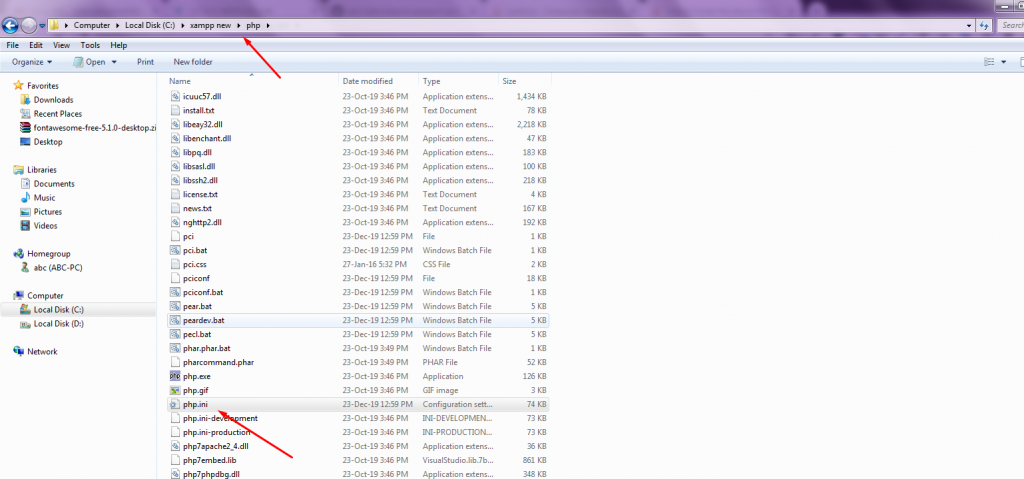
php ini


Editing the .HTACCESS File to increase maximum upload file size

Try adding the following line to the end of the .htaccess file.

php_value upload_max_filesize 64M
php_value post_max_size 64M
php_value max_execution_time 300
php_value max_input_time 300

Adding the above code may throw an error depending on your hosting server. If you get an error when using this method on Bluehost, please refer to the instructions in the Changing memory_limit and max_execution_time settings on Bluehost section of this article.

The picture above shows the system information from the WordPress site using  A2 hosting. In the case of A2, the size of upload_max_filesize is set to 2MB.  If you want to change the file upload size, please add the above code to your .htaccess file and test it. If the problem is still not resolved, please contact A2 HOST.

Add to theme function file to increase maximum upload file size

Add the following code to your theme function file.

@ini_set( 'upload_max_size' , '64M' );
@ini_set( 'post_max_size', '64M');
@ini_set( 'max_execution_time', '300' );

Surprisingly, this method can easily change the file upload size.

If the server itself imposes a file upload size limit, you will need to contact your hosting company to resolve the issue. If you are using Bluehost VPS or Dedicated plan, please refer to “Changing wp_memory_limit and max_execution_time settings”.


Addition: If you receive the any error message, please refer to the above to increase the memory size.

Business Email Domain – Get a Professional Email Address


A professional e-mail address shows you are serious. By creating an info@ email address, you can generate more sales. Setting up a new email address for you and your employees is very easy.

What Are the Benefits of a Professional Email Address?

An email address consists of four parts: name, @ symbol, domain name and domain suffix. Based on the e-mail address and subject, the recipient decides whether the message is considered legitimate and opened – or whether it ends up in the spam folder. With a reputable e-mail address, you signal much more professionalism and can thus also increase your sales.

With the free mail offers, the desired name must be available. But this is becoming increasingly difficult with domains such as @gmx.com or @gmail.com. In addition, the service is usually financed by advertisements.

With your own business email address, you enjoy clear benefits:

  • Assign the names as you wish.
  • Find a suitable domain name.
  • Stop seeing ads.
  • Use practical additional functions.


For professional purposes, it makes sense to use the company name and/or service for the domain name. If Max would like to use a professional e-mail address for his nursery and for communication with suppliers and customers, he secures the domain name “g@gmail.com”, for example.

In connection with an e-mail package, he can now assign individual e-mail addresses, for example:

It is always worth creating an info@ e-mail address, as this has established itself over time as the usual contact for general topics.

In this way, customers can already recognize the e-mails from their company from the sender.

3 Best WooCommerce Plugins for 2022

The time to grow your WooCommerce store is now – here’s what you need

Got big plans for your store in 2022?  Whether you’ve just set up shop or have been selling for years, we’ve got the tools to help you thrive. There’s no better time than now!


Eway  – WooCommerce Payment Gateway Plugin

Tired of redirecting customers to a third-party site to pay you? Use Eway to

eway
                                           eway

accept cards and subscriptions directly on your store. Trusted by 28,000+ businesses in AU, NZ, and Asia, Eway is PCI-compliant with robust fraud protection tools to boot.


Biometric Login – WooCommerce login Plugin


bio login
                                           bio login

How hackable is your store? Upgrade security for you and your customers with biometric logins. Don’t sweat forgotten passwords – swiftly log into your site using advanced fingerprint recognition or USD authentication.


SMS for WooCommerce – SMS plugin

sms woo
                                       SMS WooCommerce

Your customers don’t always have time to trawl through their emails for updates. Reach them wherever they are — text order notifications, appointment reminders, and delivery notifications directly to their mobile phone.


Hopefully you may be interested WordPress Hosting  & web hosting recommended by Reddit .


Got a minute? Tell us what you think of our Picks.